Is Your Website Losing You, Customers?
Business owners often tell me their website is “fine.” It looks decent, loads, and nothing’s broken.
But then they mention that their ad spend isn’t converting as it should. Or that their SEO has flatlined. Or that they keep getting ghosted by leads who clicked through but never filled out the form.
They often think it’s a marketing issue, but usually, it’s the website.
The WordPress Tax Nobody Talks About
Look, WordPress powers a huge chunk of the internet, and there’s a reason for that — it’s accessible, and it gets you online fast. I’m not here to trash it across the board.
But here’s what actually happens with most WordPress sites over time.
You start with a theme. Then you add a page builder. The theme doesn’t do exactly what you want. Next come plugins—one for forms, one for SEO, one for caching, security, booking, and backups. Soon, you’ve got 15-20 plugins running. Each loads its own scripts and stylesheets on every page, whether needed or not.
Nothing catastrophically breaks. It just gets heavy, slow, and fragile in subtle ways. That one plugin update quietly breaks your form on Tuesday? You might not notice until Thursday. By then, you’ve lost two days of leads.
This is what I mean by the “WordPress tax.” You’re paying in lost conversions, wasted ad spend, and time spent putting out fires. You just can’t see the invoice.
Speed Is a Revenue Problem, Not a Vanity Metric
I talk to business owners who think site speed is a nice-to-have. Something developers obsess over, but customers don’t care about.
Customers absolutely care. They just don’t tell you about it. They bounce. They hit the back button. They go to your competitor whose site loaded a full second faster. You never hear from them — you just see the gap in your analytics where the conversions should be.
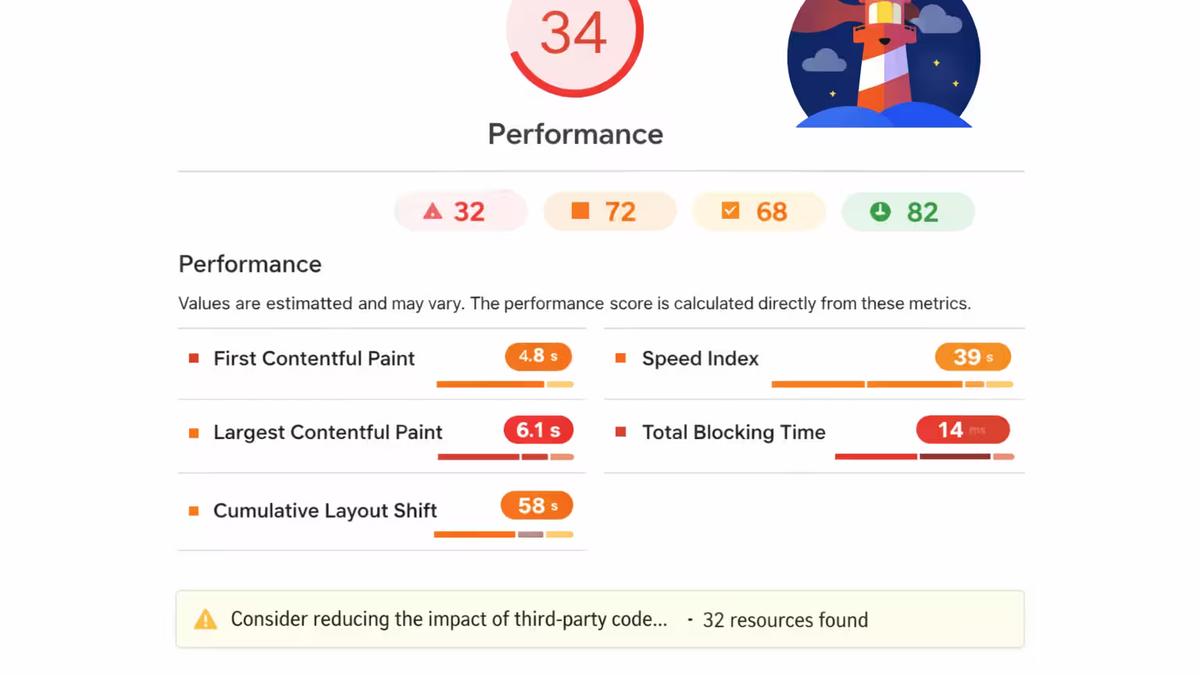
When a page builder creates 400 lines of nested div soup for a hero section, it’s not just messy code. That’s milliseconds added to the page load time. It causes layout shifts on mobile and a worse experience for every visitor. Multiply that across every section on every page. The performance hit is real.
Google knows this, too. Core Web Vitals aren’t suggestions — they directly factor into your search rankings. A slow, janky site isn’t just frustrating for visitors. It’s actively working against your SEO.
Plugin Dependency Is Technical Debt in Disguise
Here’s a question I ask clients: how many plugins are running on your site? Most don’t know off the top of their head. When they check, it’s usually somewhere between 15 and 30.
Each plugin is a dependency outside your control. The developer could abandon it, an update could conflict with another, or a security flaw could go unpatched for weeks.
Many businesses pay for “maintenance plans” that automatically update plugins and run backups. That’s better than nothing, but it doesn’t solve the underlying problem — you’ve built a critical business asset on top of a stack of third-party code that wasn’t designed to work together.
At some point, the site stops being a tool that works for you and becomes a thing you’re constantly managing.
Your Template’s Layout Isn’t Your Customer’s Journey
This one’s more subtle, but it might be the most expensive problem on the list.
When you build a site from a template, the structure of your pages follows the logic of the template — not the logic of how your customers actually make decisions. You end up with sections because the theme came with them, not because they serve a purpose in moving someone from “I’m interested” to “I’m reaching out.”
Effective websites guide people through a sequence. There’s a reason certain information appears first, a reason the call-to-action is placed where it is, a reason the page is structured the way it is. That intentionality is really hard to retrofit into a template built to look good in a demo, not to convert for your specific business.
What a Custom Next.js Build Actually Changes
When I build a site in Next.js, there’s no page builder generating bloated markup behind the scenes. No stack of plugins, each adding its own JavaScript. No theme dictating where things go.
Every line of code is there because it serves a purpose. Pages are statically generated or server-rendered — meaning they load fast because the heavy lifting happens before the visitor even clicks. Only the code that’s actually needed gets sent to the browser.
The difference is clear: faster load times, improved Core Web Vitals, cleaner code for search engines, and better security from a reduced attack surface. These factors help capture and convert more visitors.
But the biggest advantage is structural: with a custom build, every page is designed for one goal—leading the right visitor to action quickly. This intentional focus creates a smoother journey, boosting results.
If This Sounds Familiar
If you’re spending money driving traffic but the conversions aren’t there…
If your Lighthouse scores make you wince…
If you’ve got a plugin list that scrolls…
If “fixing the website” has become a recurring line item…
The problem probably isn’t your marketing. It’s the foundation on which everything else is built.
I build fast, conversion-focused Next.js websites for businesses that are done fighting their tech stack. No plugin dependency, no maintenance headaches — just a site that actually performs.
Ready to see if your website is helping or holding you back? Reach out now—let’s review your site and unlock your growth.